
STRAY KIDS Lightstick Official ver.2 — Bâton lumineux officiel
📖 How to use
STRAY KIDS official lightstick ver.2
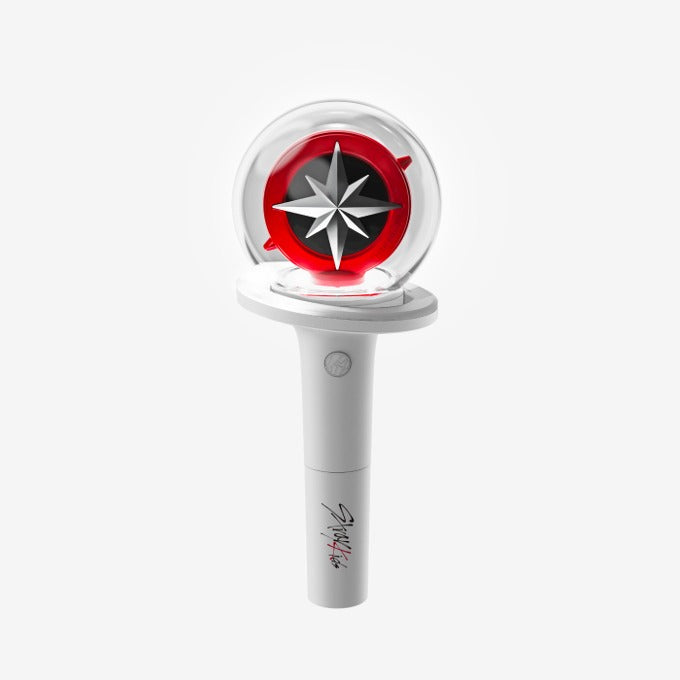
The STRAY KIDS version 2 official lightstick features the group's recognisable design: a transparent sphere holding a red circle and a star emblem, set on a white base and handle bearing the Stray Kids signature. It is the accessory STAY take to concerts, to K-pop events or in front of a live show at home.
Why we love it
- Official version 2 of the STRAY KIDS lightstick, with its emblematic star design.
- Connects to the official app to synchronise the light with the show.
- Several light modes: steady or flashing light.
- Colour selection, to follow your bias or the mood of the moment.
- White handle that is easy to hold, with a button on the grip.
How to use it
Insert the batteries and check them before you leave, then switch the lightstick on using the button located on the handle. Connect it through the official app to synchronise it during the concert, then select the light mode (steady or flashing) and the colour of your choice. Hold it by the grip and avoid knocks to the transparent sphere. After use, switch it off and store it in its box or in a pouch to limit scratches between performances.